# 2 decimal places
**URL:** https://community.linx.software/community/t/2-decimal-places/422
**Category:** Support
**Created:** [June 12, 2019, 5:36am UTC](https://community.linx.software/community/t/2-decimal-places/422 "2019-06-12T05:36:52Z")
**Posts on this page:** 6
**Page:** 1
### Author:  [@brianwhite](https://community.linx.software/community/u/brianwhite)
#### Post date: [June 12, 2019, 5:36am UTC](https://community.linx.software/community/t/2-decimal-places/422/1 "2019-06-12T05:36:53Z")
Hi Support,
I need to display a decimal only to 2 places after the comma or dot
How do i do it?
Thank you
---
### Author:  [@Dawie\_Botes](https://community.linx.software/community/u/Dawie_Botes)
#### Post date: [June 12, 2019, 6:25am UTC](https://community.linx.software/community/t/2-decimal-places/422/2 "2019-06-12T06:25:40Z")
Hi Brian,
I’m assuming you’ve got a Decimal object (MyNumber1) with a value (i.e. 3.1474436)
Then you want to use it as a String with only 2 decimals.
In your String’s assignment, you can do the following expression:
= MyNumber1.ToString(“0.##”)
This will give “3.15”
Please let me know if this doesn’t work for you.
Regards,
Dawie
---
### Author:  [@brianwhite](https://community.linx.software/community/u/brianwhite)
#### Post date: [June 12, 2019, 7:02am UTC](https://community.linx.software/community/t/2-decimal-places/422/3 "2019-06-12T07:02:06Z")
> [@Dawie\_Botes](#):
>
> o the following exp
Thank you for the feedback Dawie.
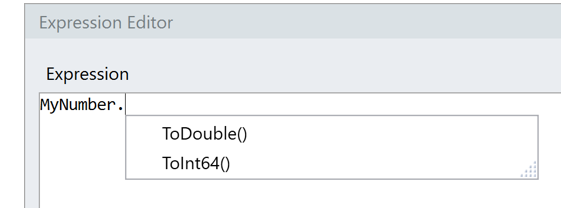
What confused me here is that in the expression editor it does not give you the option of ToString then you type .(dot)
---
### Author:  [@gawie](https://community.linx.software/community/u/gawie)
#### Post date: [June 13, 2019, 8:25am UTC](https://community.linx.software/community/t/2-decimal-places/422/4 "2019-06-13T08:25:29Z")
Also be aware of the difference between using # and 0:
“#” will output the digit of one exists.
“0” will output the digit of one exists and 0 if not.
e.g.
Where decimal = 1.2
0.## will output 1.2
0.0# will output 1.2
0.00 will output 1.20
---
### Author:  [@brianwhite](https://community.linx.software/community/u/brianwhite)
#### Post date: [June 13, 2019, 12:05pm UTC](https://community.linx.software/community/t/2-decimal-places/422/5 "2019-06-13T12:05:50Z")
> [@gawie](#):
>
> ware of the difference between using # and 0:
> “#” will output the digit of one exists.
Noted thank you Gawie
---
### Author:  [@Dawie\_Botes](https://community.linx.software/community/u/Dawie_Botes)
#### Post date: [August 21, 2019, 7:35am UTC](https://community.linx.software/community/t/2-decimal-places/422/6 "2019-08-21T07:35:11Z")
Great news. With the new version of Linx (5.16) some nice updates were made on the String functions. For instance, you can now do ToString(“0.00”) on doubles and decimals, and Linx will help you with Intellisense. Get the latest version [https://linx.software](https://linx.software).