# Base64Url encode and decode
**URL:** https://community.linx.software/community/t/base64url-encode-and-decode/469
**Category:** How To
**Created:** [October 28, 2020, 1:37pm UTC](https://community.linx.software/community/t/base64url-encode-and-decode/469 "2020-10-28T13:37:44Z")
**Posts on this page:** 6
**Page:** 1
### Author:  [@gawie](https://community.linx.software/community/u/gawie)
#### Post date: [October 28, 2020, 1:37pm UTC](https://community.linx.software/community/t/base64url-encode-and-decode/469/1 "2020-10-28T13:37:44Z")
I’m seeing more and more Base64Url encoded data being used, especially around JWT tokens. Linx supports Base64 functions in its Expressions but not Base64Url (yet). Luckily it is quite simple to do your own conversion with a Linx expression.
Base64 to Base64Url:
`=Base64.Replace("/", "_").Replace("+", "-").TrimEnd('=')`
Base64Url to Base64:
`=Base64Url.Replace("_", "/").Replace("-", "+").PadRight(Base64Url.Length + (Base64Url.Length % 4 > 0 ? 4 - Base64Url.Length % 4 : 0), '=')`
---
### Author:  [@ronan](https://community.linx.software/community/u/ronan)
#### Post date: [October 28, 2020, 2:09pm UTC](https://community.linx.software/community/t/base64url-encode-and-decode/469/2 "2020-10-28T14:09:32Z")
Also, If you need to decode a base64 encoded STR such as the Basic authentication credentials in HTTP requests, use the below expression:
```auto
= #base64EncodedString#.ToBytesFromBase64().ToString("UTF8")
```
The string `YWRtaW46YWRtaW4=` will result in `admin:admin`.
---
### Author:  [@Reema\_Choudhary](https://community.linx.software/community/u/Reema_Choudhary)
#### Post date: [March 30, 2022, 6:43am UTC](https://community.linx.software/community/t/base64url-encode-and-decode/469/3 "2022-03-30T06:43:16Z")
By using this method its giving me error… I have attached screen shot. Can you please guide.
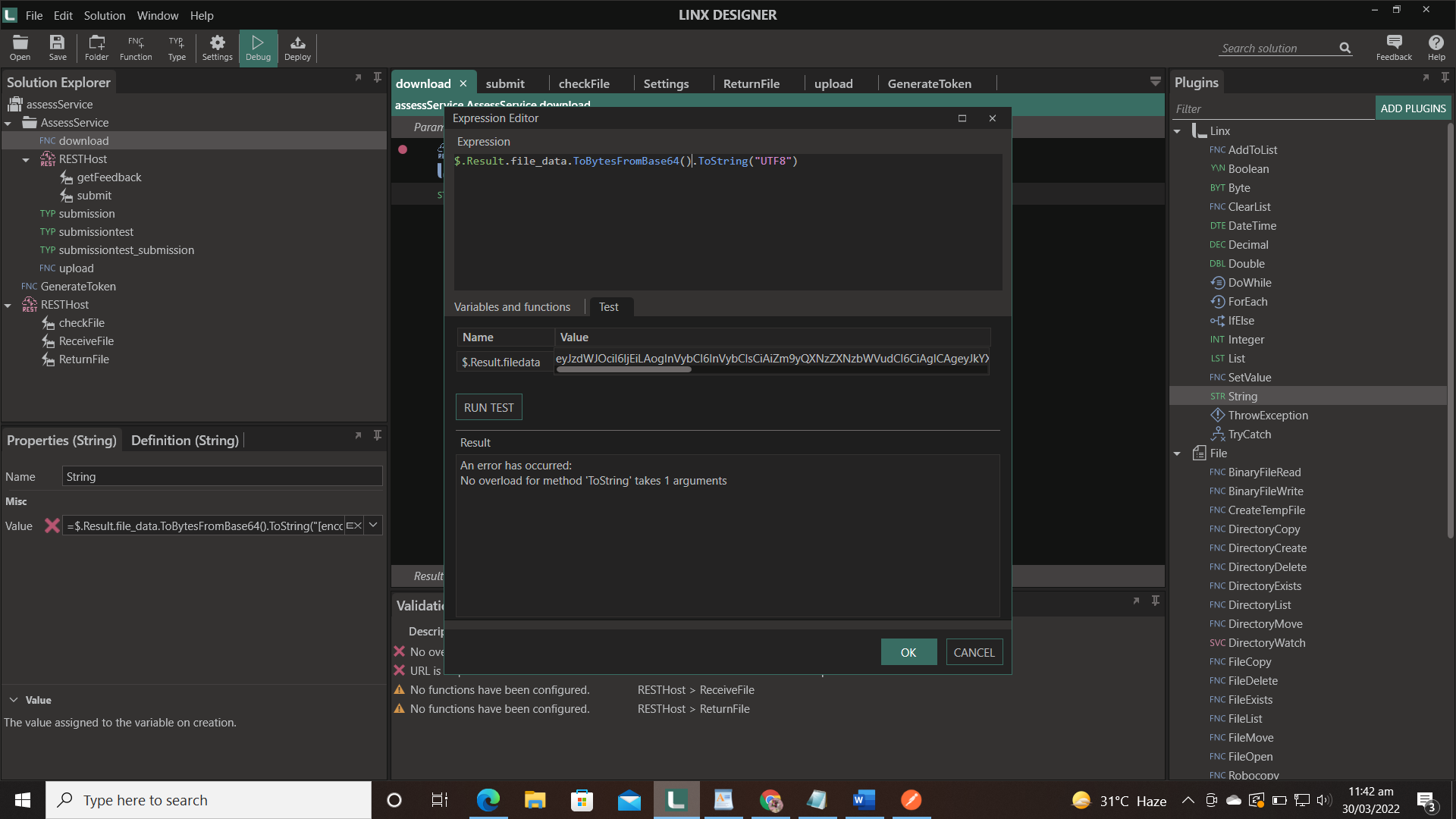
t
---
### Author:  [@Dawie\_Botes](https://community.linx.software/community/u/Dawie_Botes)
#### Post date: [March 30, 2022, 7:20am UTC](https://community.linx.software/community/t/base64url-encode-and-decode/469/4 "2022-03-30T07:20:46Z")
Hi Reema,
Welcome to the Linx Community.
I would suggest splitting this step into 2 to make it easier to debug.
Thus I would add a List to the process and change it’s type to Byte and set its value to file\_data.ToBytesFromBase64. Then I would add my String and set it’s value to List.ToString(“UTF8”)
---
### Author:  [@Reema\_Choudhary](https://community.linx.software/community/u/Reema_Choudhary)
#### Post date: [March 30, 2022, 7:54am UTC](https://community.linx.software/community/t/base64url-encode-and-decode/469/5 "2022-03-30T07:54:27Z")
Thank you for the quick response. Now its giving me error on list
Cannot assign type [List`1] to type [Byte]
I have read a json object from a service and its response contains one field with string64 data and now its not decoding.
---
### Author:  [@Dawie\_Botes](https://community.linx.software/community/u/Dawie_Botes)
#### Post date: [March 30, 2022, 8:09am UTC](https://community.linx.software/community/t/base64url-encode-and-decode/469/6 "2022-03-30T08:09:06Z")
Hi Reema,
My guess is that you’re assigning the wrong items to the wrong types. Drop us a mail at support@linx.software with the solution or screenshots of the solution and assignments.
Regards,
Dawie