# Get started with multi-threaded debugging
**URL:** https://community.linx.software/community/t/get-started-with-multi-threaded-debugging/716
**Category:** How To
**Created:** [September 19, 2024, 7:26am UTC](https://community.linx.software/community/t/get-started-with-multi-threaded-debugging/716 "2024-09-19T07:26:00Z")
**Posts on this page:** 3
**Page:** 1
### Author:  [@shamima](https://community.linx.software/community/u/shamima)
#### Post date: [September 19, 2024, 7:26am UTC](https://community.linx.software/community/t/get-started-with-multi-threaded-debugging/716/1 "2024-09-19T07:26:00Z")
## Overview
This post is designed for beginners looking to dive into multi-threaded debugging.
Multi-threaded debugging is a powerful feature in Linx that simplifies **debugging Services**. Previously, multiple functions could not be debugged simultaneously. With this new feature, users can start and stop services during debugging, allowing them to debug various services and functions concurrently.
Learn more about [https://linx.software/docs/6/reference/designer/debugtool/#debug-process](https://linx.software/docs/6/reference/designer/debugtool/#debug-process).
## Getting Started
1. **Download the Sample**
[GraphQLServerWorkingSample.zip](https://community.linx.software/community/uploads/short-url/9OQsA1GdDq6UlrEpniQicPf6HYr.zip) (39.4 KB) (Linx version 6.9.3)
The attached solution has GraphQLServer Service and a function GetBooks. The GetBooks function contains a GraphQL query that sends a query to get a list of books to the GraphQL server.
1. **Solution Overview**
The solution includes the `GraphQLServer` Service and a function called `GetBooks`, which retrieves a list of books from the GraphQL server.
## Steps to Use Multi-Threaded Debugging
- **Step 1: Start Debugging**
Right-click on the solution and click on **Debug**.
- **Step 2: Start the GraphQLServer Service**
Once the debugger is attached, right-click on the service and click **Start Service**.
- **Step 3: Start debugging the Function**
Click on `GetBooks` and then click **Start**.
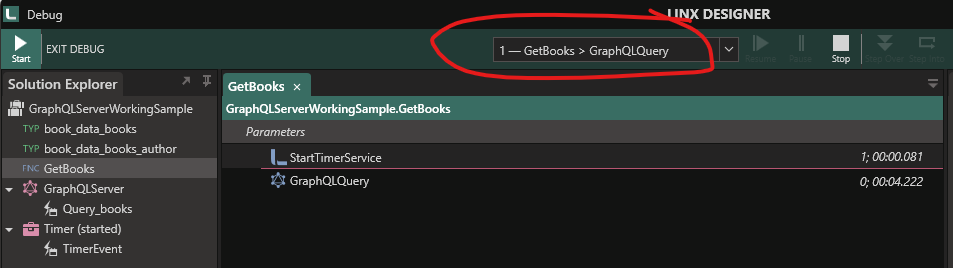
When you start to debug a function, a new thread is started. These threads are listed in the Thread dropdown in the toolbar at the top.
The selected item in the dropdown indicates the thread that is currently debugged.
- **Step 4: Using Breakpoints**
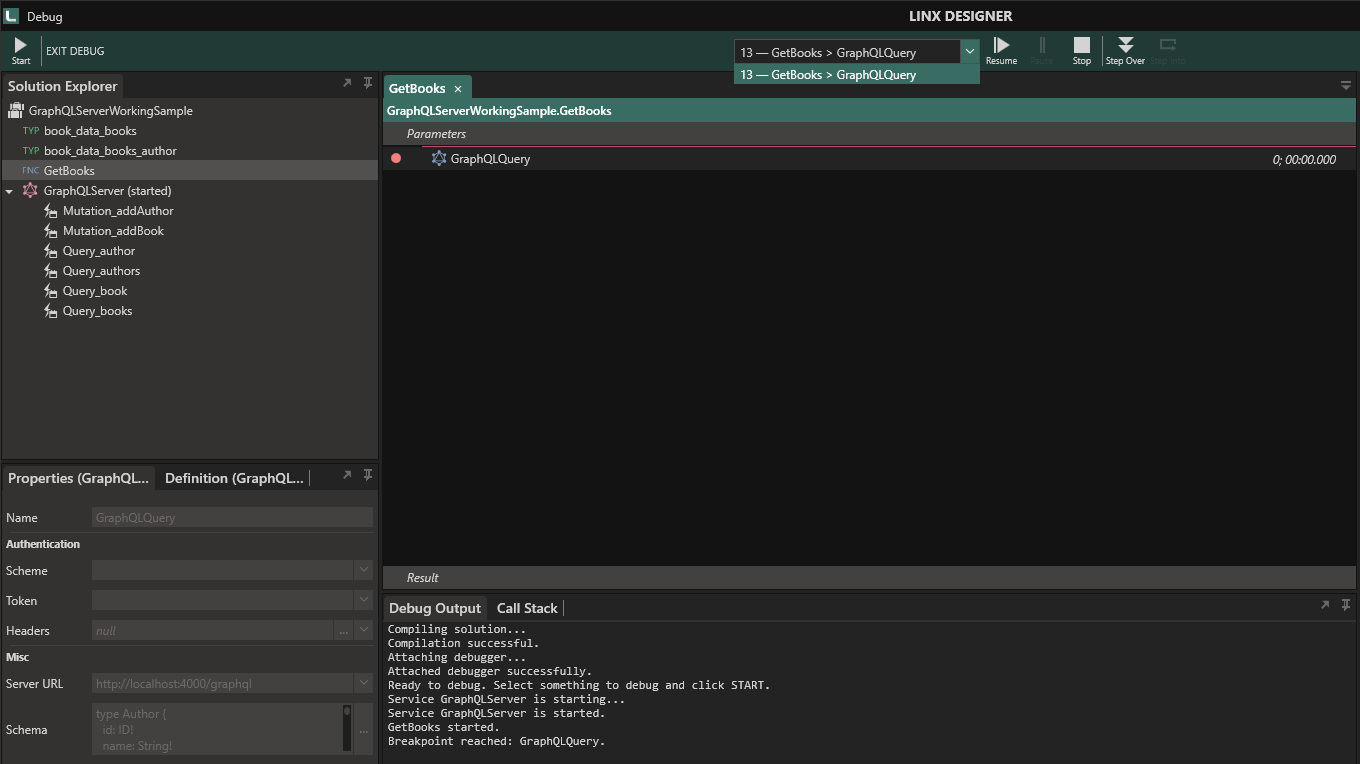
To Add a breakpoint, select the function you want to debug and press F9 or right-click on the function and select **Add a breakpoint**.
The image below shows a **breakpoint** inside the `GetBooks` function on`GraphQLQuery`.
## Happy Debugging!
---
### Author:  [@shamima](https://community.linx.software/community/u/shamima)
#### Post date: [September 19, 2024, 7:26am UTC](https://community.linx.software/community/t/get-started-with-multi-threaded-debugging/716/2 "2024-09-19T07:26:06Z")
---
### Author:  [@shamima](https://community.linx.software/community/u/shamima)
#### Post date: [September 25, 2024, 8:05am UTC](https://community.linx.software/community/t/get-started-with-multi-threaded-debugging/716/3 "2024-09-25T08:05:43Z")