# HTTp Response body trim
**URL:** https://community.linx.software/community/t/http-response-body-trim/528
**Category:** Uncategorized
**Created:** [March 19, 2021, 11:37pm UTC](https://community.linx.software/community/t/http-response-body-trim/528 "2021-03-19T23:37:49Z")
**Posts on this page:** 4
**Page:** 1
### Author:  [@Uche](https://community.linx.software/community/u/Uche)
#### Post date: [March 19, 2021, 11:37pm UTC](https://community.linx.software/community/t/http-response-body-trim/528/1 "2021-03-19T23:37:49Z")
Hi,
Great application.
I was hoping I could get some ideas about a couple of questions I have.
How do I truncate or trim a list of a Response body. I do not need all the elements of the Response body, so I need to truncate it to the part I need which is a list within a list within another list. I used a custom type to import the Jason format but I can’t seem to assign the Result to the components I really need.
Also, I used the JSONREADER, that didn’t work either…
---
### Author:  [@ronan](https://community.linx.software/community/u/ronan)
#### Post date: [March 20, 2021, 5:31am UTC](https://community.linx.software/community/t/http-response-body-trim/528/2 "2021-03-20T05:31:07Z")
Hi Uche,
So when working with response, import the whole JSON response as a custom type, then set the Output type property to this new custom type. To access a nested list, you will need to loop through the parent-level list in the response output first and then extract the nested list by either assigning the nested-list directly to another List type or by using the ForEach and then for each nested item use an AddToList to add each item to a main list.
Take a look at [this article](https://community.linx.software/community/t/getting-started-part-2-working-with-lists/512) and just do a search for ‘nested lists’.
Just to give you an example here, if I have response object like below:
```auto
{
"field1":"This is a value",
"field2":1111,
"parentList":[
[
"List1_item1",
"List1_item2",
"List1_item3"
],
[
"List2_item1",
"List2_item2",
"List2_item3"
]
]
}
```
And now I want to access the nested items i.e. `List1_item1, List2_item2....`
So first I would import the whole json as a new type, lets say ‘myResponse’:
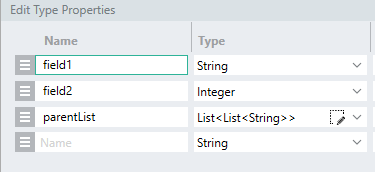
I could then use a JsonReader to use the response as the **Json string** property and the newly imported type as the **Output type** :
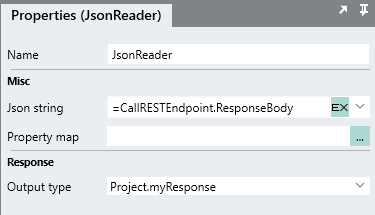
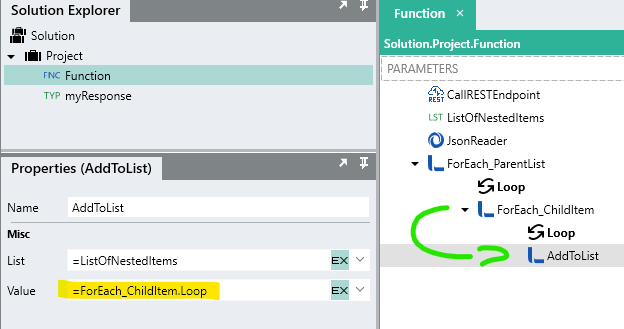
Now lets say we wanted build up a ‘master’ list of all the items in all the nested lists.
To do that, we need to first loop through the parent list, which is done by using a ForEach function and looping through the nested list returned from the JsonReader output:
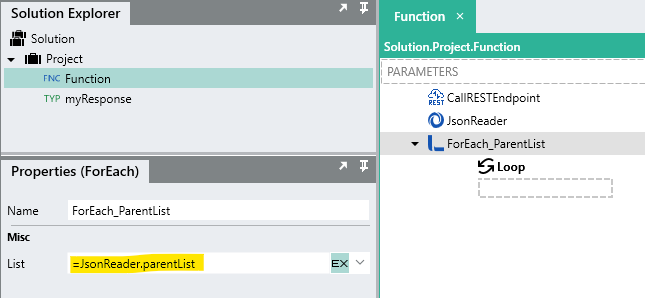
Now for each parent list, we then need to do another loop through the child list and then we will have access to the individual items:
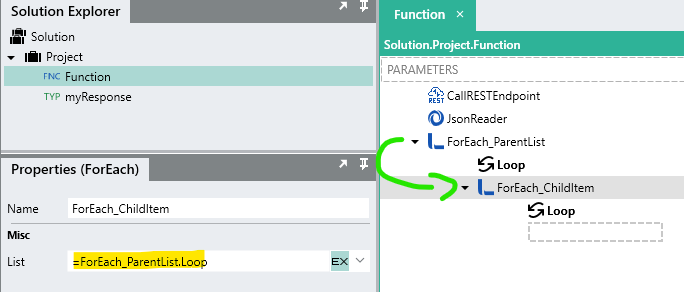
In this lowest level loop, we will have access to the items of the nested list, so we can for example add them to a main list of some kind:

So depending on what you want your end result to be the exact approach may vary.
Just reply to this if you still struggle.
---
### Author:  [@Uche](https://community.linx.software/community/u/Uche)
#### Post date: [March 21, 2021, 11:49pm UTC](https://community.linx.software/community/t/http-response-body-trim/528/3 "2021-03-21T23:49:29Z")
Thanks for the reply. That worked out well, I used foreach and added the values to a list.
I have another problem, my ifelse statement is evaluation a true condition even when it is false.
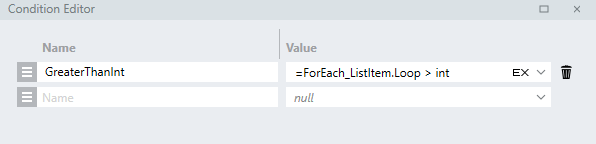
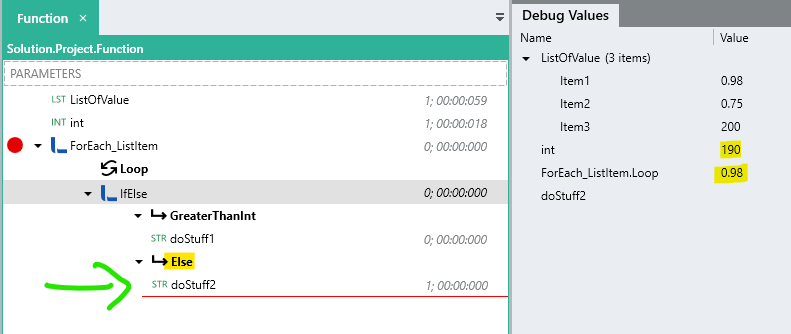
I am comparing the contents of a list to a number eg. =List[0]\>int, and setting the value of another List2 if this condition is true to List[0]. Based on this condition, 0.98\>190, still executes the true condition.
---
### Author:  [@ronan](https://community.linx.software/community/u/ronan)
#### Post date: [March 22, 2021, 6:28am UTC](https://community.linx.software/community/t/http-response-body-trim/528/4 "2021-03-22T06:28:07Z")
Hi Uche,
Just check that the **type** of List is a decimal/double so that you are comparing the same data types to each other.
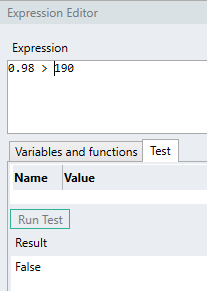
Also, are you only comparing the first element i.e. [0] ? If not, I would suggest using another ForEach to loop through the list and then compare like below: