# RESTHost - Sample Solution - CRUD and File operations
**URL:** https://community.linx.software/community/t/resthost-sample-solution-crud-and-file-operations/467
**Category:** Sample
**Created:** [October 26, 2020, 1:26pm UTC](https://community.linx.software/community/t/resthost-sample-solution-crud-and-file-operations/467 "2020-10-26T13:26:30Z")
**Posts on this page:** 2
**Page:** 1
### Author:  [@ronan](https://community.linx.software/community/u/ronan)
#### Post date: [October 26, 2020, 1:26pm UTC](https://community.linx.software/community/t/resthost-sample-solution-crud-and-file-operations/467/1 "2020-10-26T13:26:30Z")
# RESTHost - Sample API
A sample “User Management” API has been built in order to demonstrate the implementation of a “real world” scenario REST API using Linx and [RESTHost svc](https://linx.software/docs/reference/plugins/rest/content/resthost/).
The web service will contain a number of operations involved in the creation, retrieving, updating and deletion of records in a database containing “user” information.
The following operations are involved:
| Operation | Method | Authentication | Description |
| --- | --- | --- | --- |
| [Authentication event](#operationeventsauthenticate) | - | - | Event which executes for HTTP Basic and API Key security schemes. |
| [GenerateUserToken](#generateusertoken) | POST | HTTP Basic | Generates and returns a Bearer token to be used in subsequent requests. |
| [GetCurrentUser](#getcurrentuser) | GET | Bearer | Returns the details of the user associated with the submitted bearer token |
| [CreateUser](#createuser) | POST | Bearer | Inserts a submitted User into a database, |
| [UploadPhoto](#uploadphoto) | PUT | Bearer | Writes a submitted User’s image to a local drive |
| [UpdateUser](#updateuser) | PATCH | Bearer | Updates the database details of a specific user. |
| [GetUser](#getuser) | GET | Bearer | Returns the details of a specific User from a database. |
| [DownloadPhoto](#downloadphoto) | GET | Bearer | Returns the image of a User as a file stream. |
| [ListUsers](#listusers) | GET | API Key | Returns all users from a database based a filter query parameters. |
| [DeleteUser](#deleteuser) | DELETE | Bearer | Deletes a specific User’s record from the database. |
The sample attempts to demonstrate a wide variety of functionality that is available in Linx in terms of web services and basic CRUD (Create, Read, Update, Delete) operations.
Before continuing, take a look at some of the below resources to get you familiar with REST web services in Linx:
> 📗[**Learn more**](https://community.linx.software/t/resthost-guide-overview/458) about the general overview of REST web services in Linx.
> 🎯 [**Get started**](https://community.linx.software/t/resthost-get-started/466) with a “Hello World!” API.
> 🔍[**Find more**](https://community.linx.software/search?q=resthost) resources about using REST web services in Linx.
**The explanations below are mostly for Linx5 users. We`ve provided a sample below for Linx6 version.**
Feel free to contact support@linx.software and we'll assist.
## Sample Resources
The below resources are provided:
[Linx 5 sample Solution (.lsoz)](https://community.linx.software/community/uploads/short-url/zbm5DaRbcMUUYYZnfFSDMh25GIn.lsoz) (61.3 KB)
[Linx6.zip](https://community.linx.software/community/uploads/short-url/rHR0UfkH9lWm8wpt6q7AMp6Uhot.zip) (72.9 KB) - **Linx 6.0.5**
[Open API Swagger definition](https://community.linx.software/community/uploads/short-url/iew70bKd7qmgAvQ7jEcFXgQcFK1.yaml) (10.2 KB) - The API Definition used in the provide sample **Solution**.
[Database Table Create Scripts.zip](https://community.linx.software/community/uploads/short-url/iA81LEXUNrPvMZQsdlVyOUKUavB.zip) (550 Bytes) -
The CREATE TABLE script used to initially create the database objects for MS SQL server
[POSTMAN environment and requests](https://community.linx.software/community/uploads/short-url/1UeboDfGkdQ8lblQ5kHOQr2hThQ.zip) (3.5 KB) - A collection of [Postman](https://www.postman.com/) requests as well as testing environment variables has been provided in order to test the service out.
* * *
# Linx Solution Setup
**What do you need?**
- Windows 7 or higher
- Version 6 or 5 of Linx ([https://linx.software/](https://linx.software/))
- MS SQL Server
- Postman
## Configuration
Open the provided **Solution** (.lsoz) in the **Linx Designer** and update the following `$.Setting` value:
| Name | Description | Value |
| --- | --- | --- |
| db\_conn | Connection string for database connection for user record management. | #yourconnectionstring# |
> 💡 **Tip** :
>
> 1. Use the [connection editor](https://linx.software/docs/reference/plugins/database/common/connectioneditor/) to generate a connection string.
> 2. Copy the generated `Connection string` and update the `$.Setting.db_conn` value.
>
> This value can then be referenced throughout the **Solution** as a global `connection string` which can then be altered per environment.
Once configured, locate the **CreateDatabaseObjects** Function in the **Solution Explorer** , right-click, and click **Debug**. Next, click **Start** in the top menu bar. This will run the Function and execute logic using Linx functionality that will create the necessary database objects in your database to use with the sample.
**Linx Designer view**
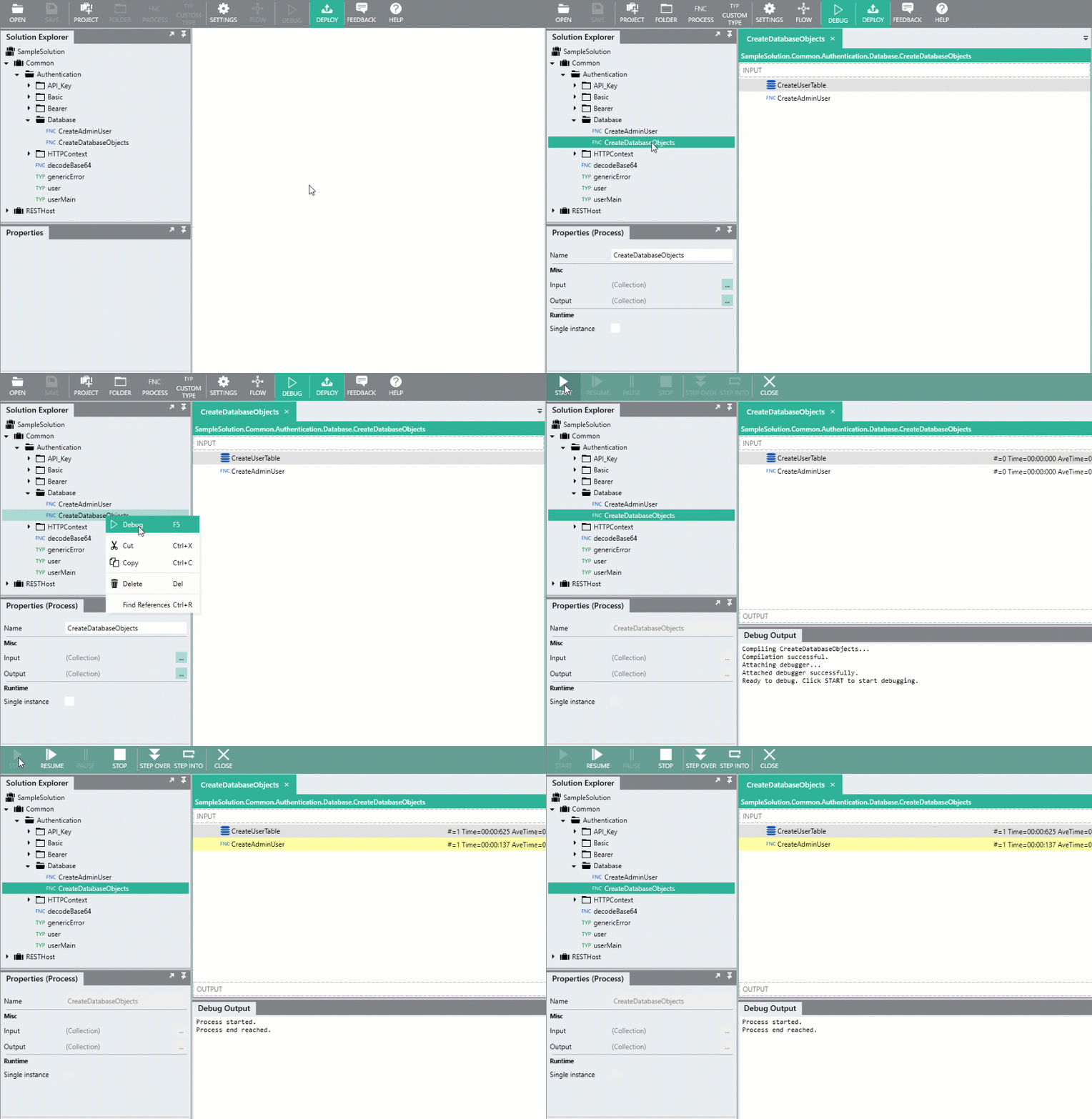
A default “user” is created in the database so that you can test the functionality of the API out. These user credentials are needed when generating the Bearer token in the first operation which will then be used in the subsequent operations.
The default credentials are:
**username** : `admin`
**password** : `admin`
* * *
## Testing
Using [Postman](https://www.postman.com/), import the provided environment settings (“Linx API Demo.postman\_environment.json”) as well as the collection of requests (“Linx RESTHost Sample Requests.postman\_collection.json”).
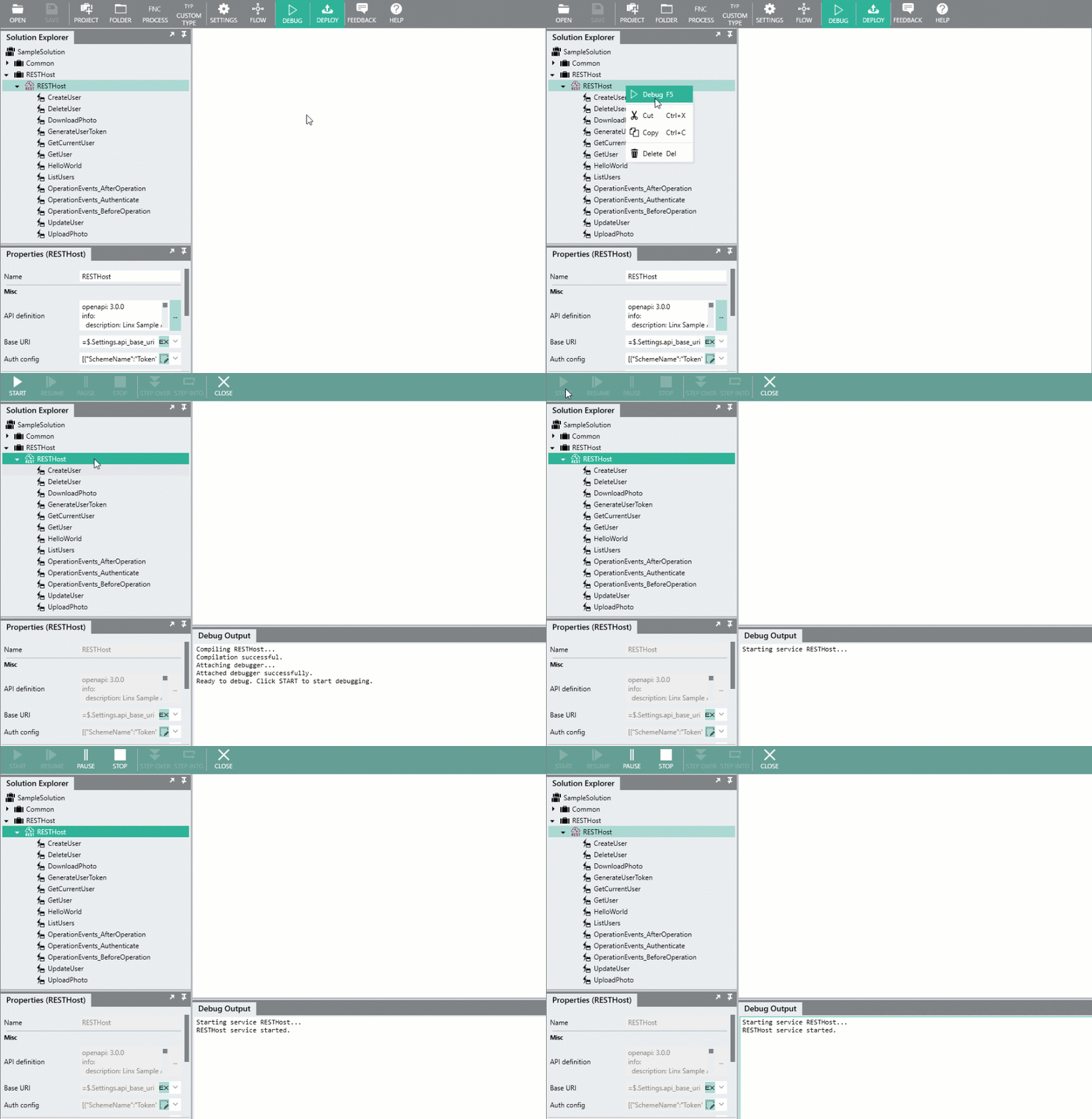
In order to test the web service and requests, the [RESTHost svc](https://linx.software/docs/reference/plugins/rest/content/resthost/) must be debugged in the **Linx Designer** using **Service Debugging**.
In the **Linx Solution** , right click on the [RESTHost svc](https://linx.software/docs/reference/plugins/rest/content/resthost/) and click **Debug**.
When you see the below text in the **Debug Output** , click **Start** in the top menu:
```http
Compiling RESTHost...
Compilation successful.
Attaching debugger...
Attached debugger successfully.
Ready to debug. Click START to start debugging.
```
You should then see the below message indicating the service is active:
```http
Starting service RESTHost...
RESTHost service started.
```
You are then able to make calls locally:
```http
http://localhost:8080/demo/#path#
```
The sample Postman request collection has been pre-configured with the default login and authentication credentials.
**Linx Designer view - Service debugging**
> 🪲 **Test it out!**
>
> 1. Start the service debugger like described above.
> 2. [Make a **Hello World**! request](http://localhost:8080/demo/helloworld)
* * *
# Operations
## Authentication event
OperationEvents\_Authenticate EVT
### Summary
Authentication event that occurs before operations that have HTTP Basic or API Key secuirty schemes applied to them.
Custom authentication logic is build here.
The custom authentication implemented below gives you an idea of how you would approach implementing custom authentication, your exact approach will differ.
* * *
### Overview
The OperationEvents\_Authenticate EVT executes before operations that have HTTP Basic or API Key authentication applied to them.
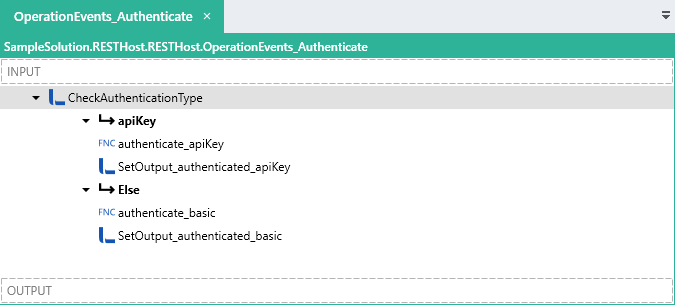
When the event executes, the type of security scheme is evaluated and the appropriate custom sub-process are executed. These sub-processes validate the authorization credentials and return the result.
The result of the event is then set to the result of these sub-processes.
> 📗[**Learn more**](https://community.linx.software/t/resthost-guide-securing-your-api/462) about implementing custom authentication logic.
**Linx Designer view**
### Event Logic
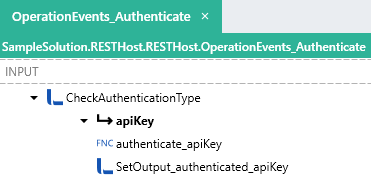
An [IfElse FNC](https://linx.software/docs/reference/plugins/linx/content/ifelse/) ( **CheckAuthenticationType** ) evaluates the following expression:
```auto
= $.Input.Data.AuthenticationData.ApiKey != $.System.Null
```
#### API Key flow
If the above condition results in `True`, this means that the current authentication scheme on the operation API Key.
In this case, a custom sub-process is called ( **authenticate\_apiKey** ), which receives an input (`apiKey`) of the submitted API Key (`$.Input.Data.AuthenticationData.ApiKey.ProvidedToken`).
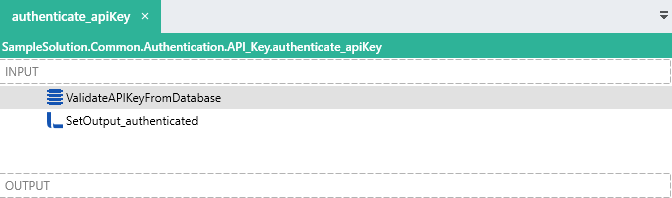
In the **authenticate\_apiKey** process, the input parameter (`$.Input.apiKey`) is validated against the User records in the database using an [ExecuteSQL FNC](https://linx.software/docs/reference/plugins/database/content/executesql/) ( **ValidateAPIKeyFromDatabase** ) with the below query:
```sql
SELECT
id,
1 [Valid]
FROM
[api_user]
WHERE
api_key = @{$.Input.apiKey}
```
The `Return options` of **ValidateAPIKeyFromDatabase** are set to `First row, else empty row`, which means a single row will be returned, even if there are no results.
The `Output` of the **authenticate\_apiKey** Function has been configured as a [Type TYP](https://linx.software/docs/reference/designer/ui/#add-a-custom-type). This `httpContext` TYP was imported using a test request by writing the full contents of the request (`$.Input.Data`) to a file using a [TextFileWrite FNC](https://linx.software/docs/reference/plugins/file/content/textfilewrite/). The text from this file was then used to import into a [TypeTYP](https://linx.software/docs/reference/designer/ui/#add-a-custom-type) from the JSON values.
The `$.Result.authenticated_user` of the **authenticate\_apiKey** Function is set using a [SetValue FNC](https://linx.software/docs/reference/plugins/linx/content/setvalue/) ( **SetOutput\_authenticated** ). The source of the output will come from the results of the **ValidateAPIKeyFromDatabase** database query.
When the sub-process **authenticate\_apiKey** Function has completed, the execution flow will return to OperationEvents\_Authenticate EVT, with the **authenticate\_apiKey** Function returning the result of the database validation.
The `$.Result.Data.HtpContext.User.IsAuthenticated` result of the OperationEvents\_Authenticate EVT is then set as the results returned from the **authenticate\_apiKey** process.
#### HTTP Basic flow
If the ( **CheckAuthenticationType** ) evaluates to `False` then this means the security scheme of the operation is HTTP Basic.
In this case, a call is made to the sub-process **authenticate\_basic** , which receives an input (`authorizationHeaderValue`) of the submitted `Authorization` header value which has been extracted from the headers with the below expression:
```auto
=$.Input.Data.HttpContext.Headers.SelectMany(headers => headers.Value).Where(item => item.StartsWith("Basic ")).First().Replace("Basic ","")
```
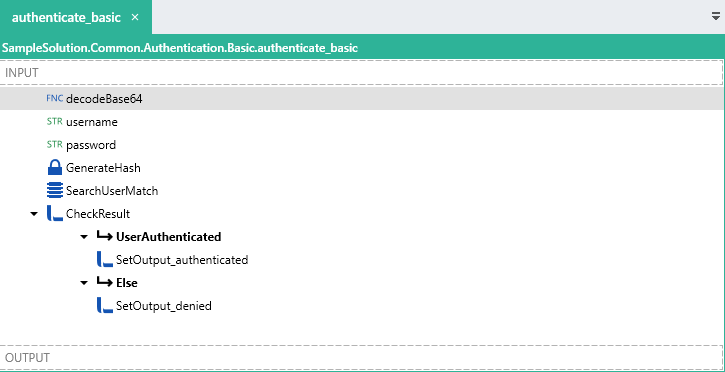
The **authenticate\_basic** Function executes the following logic.
First, a custom sub-process ( **decodeBase64** ) is called which returns the decoded `username` and `password`.
A hash of the `password` is then generated using a [GenerateHash FNC](https://linx.software/docs/reference/plugins/cryptography/content/generatehash/) ( **GenerateHash** ) .
The result of **GenerateHash** is then compared with the stored password of the user record matching the decoded `username` using an [ExecuteSQL FNC](https://linx.software/docs/reference/plugins/database/content/executesql/)
( **SearchUserMatch** ) and the below query:
```auto
SELECT id
,username
,password
,first_name
,last_name
,email
,api_key
,jwt_secret
FROM dbo.api_user
WHERE username = @{username}
AND password = @{GenerateHash}
```
An [IfElse FNC](https://linx.software/docs/reference/plugins/linx/content/ifelse/) ( **CheckResult** ) evaluates the result of the **SearchUserMatch** query execution with the below expression:
```auto
= SearchUserMatch.id > 0
```
If the above condition evaluates to a `True`, then the credentials are valid ( **UserAuthenticated** ).
The `Return options` of **SearchUserMatch** are set to `First row, else empty row`, which means a single row will be returned, even if there are no results.
The `Output` of the **authenticate\_basic** Function has been configured as a [Type TYP](https://linx.software/docs/reference/designer/ui/#add-a-custom-type). This `httpContext` TYP was imported using a test request by writing the full contents of the request (`$.Input.Data`) to a file using a [TextFileWrite FNC](https://linx.software/docs/reference/plugins/file/content/textfilewrite/). The text from this file was then used to import into a [Type TYP](https://linx.software/docs/reference/designer/ui/#add-a-custom-type) from the JSON values.
The `$.Result.authenticated_user` of the **authenticate\_basic** Function is set using a [SetValue FNC](https://linx.software/docs/reference/plugins/linx/content/setvalue/) ( **SetOutput\_authenticated** ). The `IsAuthenticated` field is set to `True` and the other user details returned from the database are added to the additional `user` fields.
When the sub-process **authenticate\_basic** Function has completed, the execution flow will return to OperationEvents\_Authenticate EVT, with the **authenticate\_basic** Function returning the result of the database validation.
The `$.Result.Data.HtpContext.User.IsAuthenticated` result of the OperationEvents\_Authenticate EVT is then set as the results returned from the **authenticate\_basic** process.
#### Event result
The result of OperationEvents\_Authenticate EVT will affect the request flow. In order to indicate a successful authentication, then the value of `$.Result.Data.HtpContext.User.IsAuthenticated` must be set to `True`, if not, it will default to `False` and a `(401) Unauthorized` response will be returned.
The `$.Result.Data.HtpContext.User` object is also used to pass additional user authentication related information to the main operation.
Inside the sub-processes, the outputs are set the the details of the database query like below:
```auto
{
"Name":{
"LinxExpression":"SearchUserMatch.id"
},
"AuthenticationType":"Basic",
"IsAuthenticated":"True"
```
In this case, the values returned from the validations are added to the `$.Result.Data.HtpContext.User` of OperationEvents\_Authenticate EVT so that they can be used in the main operation without having to re-extract this information.
```auto
{
"Name":{
"LinxExpression":"authenticate_basic.authenticated_user.Name"
},
"AuthenticationType":"basic",
"IsAuthenticated":{
"LinxExpression":"authenticate_basic.authenticated_user.IsAuthenticated"
}
}
```
* * *
## GenerateUserToken
### Summary
Generates a JWT Token to be used in the HTTP Bearer authentication scheme applied to subsequent operations.
### Overview
The **GenerateUserToken** operation involves a `POST` request made to the `/users/token` endpoint.
The request contains an `Authorization` header containing the HTTP Basic authentication credentials.
The request parameters are first validated according to the specification and then the request is authenticated via custom authentication logic.
Once the data and authentication validations have taken place the **GenerateUserToken** operation is executed.
The operation generates a JWT Token to be used in subsequent requests with the HTTP Bearer security scheme applied to them.
> 📗[**Learn more**](https://community.linx.software/t/jwt-token-generation/463) about JWT Token generation.
**Linx Designer view**
### Operation Logic
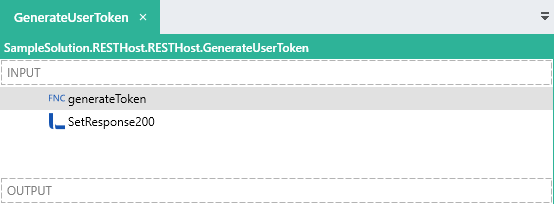
A Function call is made to a custom Function **generateToken** which takes in a `unique_name` input.
The `id` of the authenticated user which is passed in from the **OperationEvents\_Authenticate** EVT is configured as the input of this **generateToken** sub-process.
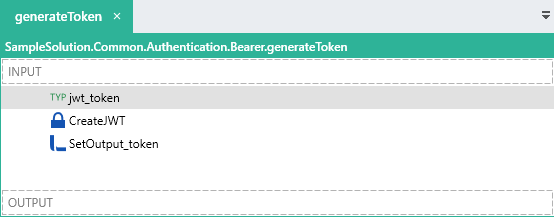
This sub-process **generateToken** , generates a JWT token using the `$.Input.id`
When the **generateToken** Function completes, the execution flow will return to the **GenerateUserToken** operation and the `$.Result.Data.Response200` is set to the `token` object returned from the **generateToken** process.
### HTTP Request Details
#### HTTP Request
| Method | Path |
| — | — | — |
| `POST` | `/users/token` |
#### Request Headers
| Header | Value |
| — | — | — |
|`Authorization` | `Basic ` _base64encoded_ ( `username:password` ) |
| `Content-Type` | `application/json` |
In the Linx sample, the default username and password are both `admin`.
#### Request Parameters
| Name | Location |
| — | — | — |
| NONE | - |
#### Request Body
Do not supply a request body for this method.
#### Response
If successful, a `(200) OK` response is returned with the response body containing a JSON object containing the JWT Token.
```json
{
"access_token": "eyJhbGciOiJIUzI1NiIsInR5cCI6IkpXVCJ9.eyJpc3MiOiJsaW54Iiwic3ViIjoiIiwiYXVkIjoiIiwiZXhwIjoiMTYwMzcyOTQyMC41MzkyOTQ3IiwibmJmIjoiIiwiaWF0IjoiIiwianRpIjoiIiwidW5pcXVlX25hbWUiOiIxIn0.v4-aTfoN8NdEIbEenRzsqAkAzPUUNv0bWlO7SwKtRkA",
"expires_in": 3600,
"token_type": "Bearer"
}
```
#### Sample request
```http
POST http://localhost:8080/demo/users/token HTTP/1.1
Authorization: Basic YWRtaW46YWRtaW4=
User-Agent: PostmanRuntime/7.26.5
Accept: */*
Cache-Control: no-cache
Postman-Token: 6a0581fe-ec9d-4f18-a4a5-24199246bf9f
Host: localhost:8080
Accept-Encoding: gzip, deflate, br
Connection: keep-alive
Content-Length: 0
```
* * *
## GetCurrentUser
### Summary
Returns the details of the authenticated user of the request.
### Overview
The **GetCurrentUser** operation involves a `GET` request made to the `/me` endpoint.
The request contains an `Authorization` header containing the Bearer authentication token.
The request parameters are first validated according to the specification and then the request is authenticated internally according to the Bearer Authentication security scheme configured.
Once the data and authentication validations have taken place the **GetCurrentUser** operation is executed.
The `unique_name` claim of the JWT Token is passed into the operation for the authentication event. This `unique_name` claim contains the `id` of the user associated with the token when it was generated.
The details of the user record in the database matching this `id` are returned in the response.
> 📗[**Learn more**](https://community.linx.software/t/jwt-token-verification/464) about verifying JWT Tokens.
**Linx Designer view**
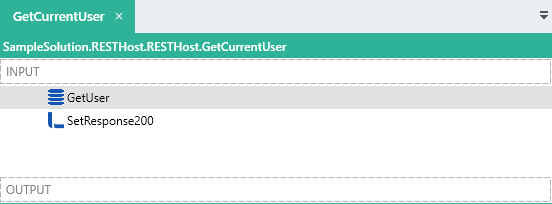
### Operation Logic
An [ExecuteSQL FNC](https://linx.software/docs/reference/plugins/database/content/executesql/) ( **GetUser** ) is used to query a `user` record from the database that matches the value passed in with the `$.Input.Data.HttpContext.User.Name`.
```sql
SELECT
id,
username,
email,
first_name,
last_name
FROM
[api_user]
WHERE
id = @{$.Input.Data.HttpContext.User.Name}
```
> The `Return options` of the [ExecuteSQL FNC](https://linx.software/docs/reference/plugins/database/content/executesql/) is set to `First row, else empty row`, which means that a result row will be returned always. If no data is returned, the output fields will be set as their TYP default.
The `$.Result.Data.Response200` is set the details returned from the database query like below:
```auto
{
"user":{
"email":{
"LinxExpression":"GetUser.email"
},
"username":{
"LinxExpression":"GetUser.username.ToUpper()"
},
"id":{
"LinxExpression":"GetUser.id"
},
"firstname":{
"LinxExpression":"GetUser.first_name"
},
"lastname":{
"LinxExpression":"GetUser.last_name"
}
}
}
```
### HTTP Request Details
#### HTTP Request
| Method | Path |
| — | — | — |
| `GET` | `/me` |
#### Request Headers
| Header | Value |
| — | — | — |
| `Authorization` | `Bearer {token}` |
#### Request Parameters
| Name | Location |
| — | — | — |
| NONE | -|
#### Request Body
Do not supply a request body for this method.
#### Response
If successful, a `(200) OK` response is returned with the response body containing a JSON `user` object containing the details of the authenticated user.
#### Sample request
```http
GET http://localhost:8080/demo/me HTTP/1.1
Authorization: Bearer eyJhbGciOiJIUzI1NiIsInR5cCI6IkpXVCJ9.eyJpc3MiOiJsaW54Iiwic3ViIjoiIiwiYXVkIjoiIiwiZXhwIjoiMTYwMzg4NjU5NC41MzI1NDk5IiwibmJmIjoiIiwiaWF0IjoiIiwianRpIjoiIiwidW5pcXVlX25hbWUiOiIxIn0.zSo7Mqzy7YQDf3IlpK7AHdQtlcHkYpdKQS_8WXcOvDc
User-Agent: PostmanRuntime/7.26.5
Accept: */*
Cache-Control: no-cache
Postman-Token: ef3928c5-5a15-4012-a64e-9fd6b7d71bea
Host: localhost:8080
Accept-Encoding: gzip, deflate, br
Connection: keep-alive
...
HTTP/1.1 200 OK
Transfer-Encoding: chunked
Content-Type: application/json; charset=utf-8
Server: Microsoft-HTTPAPI/2.0
Date: Wed, 28 Oct 2020 10:25:32 GMT
{"user":{"email":"","username":"ADMIN","id":"1","firstname":"admin","lastname":"admin"}}
```
* * *
## Create User (POST)
### Summary
Create a new user record in the database.
### Overview
The **CreateUser** operation involves a `POST` request made to the `/users` endpoint.
The request contains an `Authorization` header containing the Bearer authentication token.
A `JSON request body` is submitted containing a `user` object.
The request parameters are first validated according to the specification and then the request is authenticated internally according to the Bearer Authentication security scheme configured.
Once the data and authentication validations have taken place the **CreateUser** operation is executed.
The submitted `user` is first validated according to custom rules and if valid, the details contained in the `user` object are added to the database.
> 📗[**Learn more**](https://community.linx.software/t/resthost-guide-working-with-inputs/460) about working with request bodies.
**Linx Designer view:**
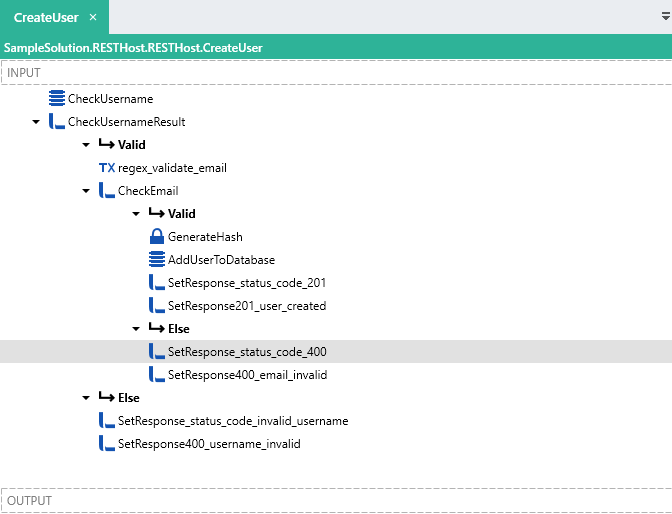
### Operation Logic
An [ExecuteSQL FNC](https://linx.software/docs/reference/plugins/database/content/executesql/) ( **CheckUsername** ) queries a SQL Server Database for a user with the username matching `$.Input.Data.body.user.username`.
```sql
IF EXISTS (SELECT 1 FROM [api_user] WHERE [username] = @{$.Input.Data.body.user.username})
BEGIN
SELECT 0 [Valid], 'Username: already exists.' [Message]
END
ELSE
BEGIN
SELECT 1 [Valid], 'Username valid.' [Message]
END
```
This returns a field called `Valid` which is an [INT TYP](https://linx.software/docs/reference/plugins/linx/content/integer/).
An [IfElse FNC](https://linx.software/docs/reference/plugins/linx/content/ifelse/) ( **CheckUsernameResult** ) checks that the output of **CheckUsername** using the below expression:
```http
= CheckUsername.Valid == 1
```
If the username does not exist, a [RegularExpression FNC](https://linx.software/docs/reference/plugins/text/content/regularexpression/) ( **regex\_validate\_email** ) validates the format of the `$.Input.Data.body.user.email` field using the below expression:
```http
^[\w-\.]+@([\w-]+\.)+[\w-]{2,4}$
```
This returns a `Success` result which is a [Y\N TYP](https://linx.software/docs/reference/plugins/linx/content/boolean/) result.
An [IfElse FNC](https://linx.software/docs/reference/plugins/linx/content/ifelse/) ( **CheckEmail** ) checks that the value of `regex_validate_email.Success`. If this value is `True` then then `$.Input.Data.body.user.password` is hashed using a [GenerateHash FNC](https://linx.software/docs/reference/plugins/cryptography/content/generatehash/) ( **GenerateHash** ).
The hashed password and user details are then added to a database using an [ExecuteSQL FNC](https://linx.software/docs/reference/plugins/database/content/executesql/) ( **AddUserToDatabase** ) with the below SQL query.
```sql
INSERT INTO dbo.api_user
(username
,password
,first_name
,last_name
,email
)
VALUES
(
@{$.Input.Data.body.user.username},
@{GenerateHash},
@{$.Input.Data.body.user.firstname},
@{$.Input.Data.body.user.lastname},
@{$.Input.Data.body.user.email}
);
SELECT @@IDENTITY [ID]
```
**AddUserToDatabase** returns the newly created `ID`.
To indicate a successful operation, the response is set to `201`.
This is done by using a [SetValue FNC](https://linx.software/docs/reference/plugins/linx/content/setvalue/) ( **SetResponse\_status\_code\_201** ) to first set the `$.Result.Data.HTTPContext` to:
```auto
{
"StatusCode":"201"
}
```
The `$.Result.Data.Response201` `response body` is then set using another [SetValue FNC](https://linx.software/docs/reference/plugins/linx/content/setvalue/) ( **SetResponse201\_user\_created** ). The values of the `response body` are set like below:
```auto
{
"user":{
"email":{
"LinxExpression":"$.Input.Data.body.user.email"
},
"username":{
"LinxExpression":"$.Input.Data.body.user.username"
},
"id":{
"LinxExpression":"AddUserToDatabase.ID"
},
"firstname":{
"LinxExpression":"$.Input.Data.body.user.firstname"
},
"lastname":{
"LinxExpression":"$.Input.Data.body.user.lastname"
}
}
}
```
If the result of any of the validations fail, the response of the operation is set to `400` and the `Response400` is set to the appropriate error message.
### HTTP Request Details
#### HTTP Request
| Method | Path |
| — | — | — |
| `POST` | `/users` |
#### Request Headers
| Header | Value |
| — | — | — |
| `Authorization` | `Bearer {token}` |
| `Content-Type` | `application/json` |
#### Request Parameters
| Name | Location |
| — | — | — |
| None | - |
#### Request Body
```auto
{
"user":{
"email":"test@test.com",
"username":"Linx",
"firstname":"linx",
"lastname":"software",
"password":"p@ssw0rd"
}
}
```
#### Response
If successful, a `(201) Created` response is returned with a `user` object in the response body.
```auto
{
"user":{
"email":"test@test.com",
"username":"Linx",
"id":"2",
"firstname":"linx",
"lastname":"software"
}
}
```
* * *
### Example Request
#### Successful Request
```auto
POST http://localhost:8080/demo/users HTTP/1.1
Authorization: Bearer eyJhbGciOiJIUzI1NiIsInR5cCI6IkpXVCJ9.eyJpc3MiOiJsaW54Iiwic3ViIjoiIiwiYXVkIjoiIiwiZXhwIjoiMTYwMzgwMzE5OS45MDI3NDY3IiwibmJmIjoiIiwiaWF0IjoiIiwianRpIjoiIiwidW5pcXVlX25hbWUiOiIxIn0.ZBiQSWJJHAJA86I2EMbkPQ0ApWlD1z8qHPsUCyht22w
Content-Type: application/json
User-Agent: PostmanRuntime/7.26.5
Accept: */*
Cache-Control: no-cache
Postman-Token: 0f427b08-0a7c-42ec-b813-8373b5d2e6cb
Host: localhost:8080
Accept-Encoding: gzip, deflate, br
Connection: keep-alive
Content-Length: 172
{
"user":{
"email":"test2@test.com",
"username":"Demo",
"firstname":"linx",
"lastname":"software",
"password":"p@ssw0rd"
}
}
...
HTTP/1.1 201 Created
Transfer-Encoding: chunked
Content-Type: application/json; charset=utf-8
Server: Microsoft-HTTPAPI/2.0
Date: Tue, 27 Oct 2020 09:55:48 GMT
{"user":{"email":"test2@test.com","username":"Demo2","id":"5","firstname":"linx","lastname":"software"}}
```
#### Invalid Request
The below response is a custom internal validation inside the operation.
```auto
HTTP/1.1 400 Bad Request
Content-Type: text/plain; charset=utf-8
Server: Microsoft-HTTPAPI/2.0
Date: Tue, 27 Oct 2020 09:55:42 GMT
Content-Length: 74
{"summary":"Invalid fields","errors":["Username: Already exists [Demo1]"]}
```
* * *
## GetUser (GET)
### Summary
Retrieve the details of specific user from the database.
A user record matching the ID parameter is returned.
### Overview
The **GetUser** operation involves a `GET` request made to the `/users/{id}` endpoint.
The request contains an `Authorization` header containing the Bearer authentication token.
An `id` path parameter is included in the request URL.
The request parameters are first validated according to the specification and then the request is authenticated internally according to the Bearer Authentication security scheme configured.
Once the data and authentication validations have taken place the **GetUser** operation is executed.
A user’s details from the database matching a submitted `id` are queried from a database and returned.
> 📗[**Learn more**](https://community.linx.software/t/resthost-guide-working-with-inputs/460#path) about working with path parameters.
**Linx Designer view:**
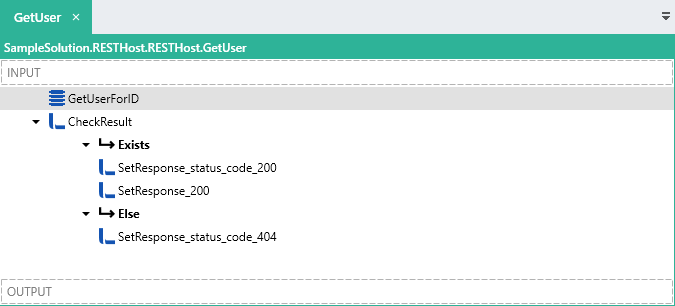
### Operation Logic
An [ExecuteSQL FNC](https://linx.software/docs/reference/plugins/database/content/executesql/) ( **GetUserForID** ) is used to query a `user` record from the database that matches the `id` path parameter with the below query:
```sql
SELECT id
,username
,first_name
,last_name
,email
FROM dbo.api_user
WHERE id = @{$.Input.Data.id}
```
> The `Return options` of the [ExecuteSQL FNC](https://linx.software/docs/reference/plugins/database/content/executesql/) is set to `First row, else empty row`, which means that a result row will be returned always. If no data is returned, the output fields will be set as their TYP default.
An [IfElse FNC](https://linx.software/docs/reference/plugins/linx/content/ifelse/) ( **CheckResult** ) evaluates the result of **GetUserForID** with the following expression:
```http
= GetUserForID.id > 0
```
If the user exists, then the `$.Result.Data.Response200` is set the details returned from the database query like below:
```auto
{
"user":{
"email":{
"LinxExpression":"GetUserForID.email"
},
"username":{
"LinxExpression":"GetUserForID.username.ToUpper()"
},
"id":{
"LinxExpression":"GetUserForID.id"
},
"firstname":{
"LinxExpression":"GetUserForID.first_name"
},
"lastname":{
"LinxExpression":"GetUserForID.last_name"
}
}
}
```
### HTTP Request Details
#### HTTP Request
| Method | Path |
| — | — | — |
| `GET` | `/users/{id}` |
#### Request Headers
| Header | Value |
| — | — | — |
| `Authorization` | `Bearer {token}` |
#### Request Parameters
| Name | Location |
| — | — | — |
| `id` | Path |
#### Request Body
Do not supply a request body for this method.
#### Response
If successful, a `(200) OK` response is returned with a `user` object in the response body.
* * *
### Example Request:
```http
GET http://localhost:8080/demo/users/2 HTTP/1.1
Authorization: Bearer eyJhbGciOiJIUzI1NiIsInR5cCI6IkpXVCJ9.eyJpc3MiOiJsaW54Iiwic3ViIjoiIiwiYXVkIjoiIiwiZXhwIjoiMTYwMzgxMDE0Mi4wMTkwNDM0IiwibmJmIjoiIiwiaWF0IjoiIiwianRpIjoiIiwidW5pcXVlX25hbWUiOiIxIn0.GP992w6ddaqJUcJbxjLjD_hWImDSz-po8t-5OlpLeAk
User-Agent: PostmanRuntime/7.26.5
Accept: */*
Cache-Control: no-cache
Postman-Token: 75f78d03-de5d-41d5-8a13-d74fba7458d0
Host: localhost:8080
Accept-Encoding: gzip, deflate, br
Connection: keep-alive
...
HTTP/1.1 200 OK
Transfer-Encoding: chunked
Content-Type: application/json; charset=utf-8
Server: Microsoft-HTTPAPI/2.0
Date: Tue, 27 Oct 2020 11:49:20 GMT
{"user":{"email":"test2@test.com","username":"LINX","id":"2","firstname":"linx","lastname":"sotware"}}
```
* * *
## UploadPhoto (PUT)
### Summary
Writes the contents of a submitted binary image to a local file.
### Overview
The **UploadPhoto** operation involves a `PUT` request made to the `/users/{id}/photo&` endpoint.
The request contains an `Authorization` header containing the Bearer authentication token.
An `id` path parameter is included in the request URL.
A binary request body is submitted containing a binary stream representing a file.
The request parameters are first validated according to the specification and then the request is authenticated internally according to the Bearer Authentication security scheme configured.
Once the data and authentication validations have taken place the **UploadPhoto** operation is executed.
> 📗[**Learn more**](https://community.linx.software/t/resthost-guide-working-with-inputs/460#filebody) about with working with file request bodies.
**Linx Designer view**
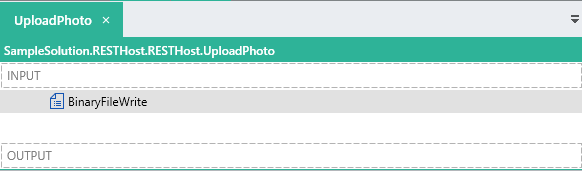
### Operation Logic
A [BinaryFileWrite FNC](https://linx.software/docs/reference/plugins/file/content/binaryfileread/) is used to write the value of the `$.Input.Data.body` (which is a LST\ TYP ) to a file with the filename built from an expression:
```auto
= $.Settings.baseFilePath + $.Input.Data.id + "_user_profile_pic.jpeg"
```
This will result in a `.jpeg` file being written (only if the summitted file was a `.jpeg).
The response `(200) OK` is returned by default with `no-content`, if an error does occur or an exception is thrown , then a `(500) Internal Server Error` will be returned by default.
### HTTP Request Details
#### HTTP Request
| Method | Path |
| — | — | — |
| `PUT` | `/users/{id}/photo` |
#### Request Headers
| Header | Value |
| — | — | — |
| `Authorization` | `Bearer {token}` |
|`Content-Type` | `application/octet-stream` |
#### Request Parameters
| Name | Location |
| — | — | — |
| `id` | path |
#### Request Body
A binary file stream of a file.
#### Response
If successful, a `(200) OK` response is returned.
* * *
### Example Request
#### Successful Request
```http
PUT http://localhost:8080/demo/users/2/photo HTTP/1.1
Content-Type: application/octet-stream
Authorization: Bearer eyJhbGciOiJIUzI1NiIsInR5cCI6IkpXVCJ9.eyJpc3MiOiJsaW54Iiwic3ViIjoiIiwiYXVkIjoiIiwiZXhwIjoiMTYwMzgyMjAzMi4zNzUwMDk1IiwibmJmIjoiIiwiaWF0IjoiIiwianRpIjoiIiwidW5pcXVlX25hbWUiOiIxIn0.pGDmtLfM8FUSXmR2JrF1o3IxLjJa1GI1wS0QAywQlC0
User-Agent: PostmanRuntime/7.26.5
Accept: */*
Cache-Control: no-cache
Postman-Token: 3a172e2f-15ac-4285-826d-b5a58e2467ea
Host: localhost:8080
Accept-Encoding: gzip, deflate, br
Connection: keep-alive
Content-Length: 6703
PNG
IHDR h h sBIT O _zTXtRaw profile type APP1 JO K- LV(( O I R c . K K D ...
...
HTTP/1.1 200 OK
Content-Length: 0
Content-Type: text/plain; charset=utf-8
Server: Microsoft-HTTPAPI/2.0
Date: Tue, 27 Oct 2020 15:07:16 GMT
```
* * *
## DownloadPhoto (GET)
### Summary
Returns the contents of a user photo - stream (file).
### Overview
The **DownlodPhoto** operation involves a `GET` request made to the `/users/{id}/photo` endpoint.
The request contains an `Authorization` header containing the Bearer authentication token.
An `ID` path parameter is included in the request URL.
The request parameters are first validated according to the specification and then the request is authenticated internally according to the Bearer Authentication security scheme configured.
Once the data and authentication validations have taken place the **DownlodPhoto** operation is executed.
A search is performed on a directory for a file matching a custom filter based on the submitted users `id`.
The contents of the file are then returned in a file stream.
**Linx Designer view:**
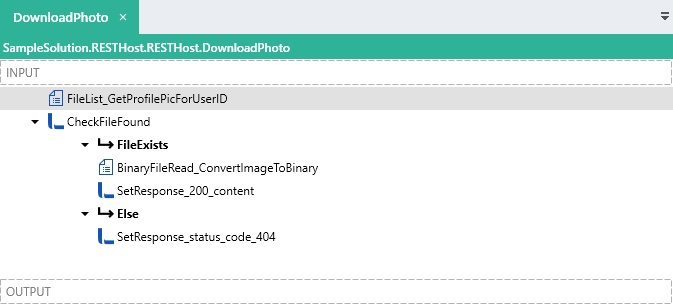
### Operation Logic
A [FileList FNC](https://linx.software/docs/reference/plugins/file/content/filelist/) ( **FileList\_GetProfilePicForUserID** ) scans a file directory for an image file matching the `ID` path parameter with the below as the filter:
```http
= $.Input.Data.id + "_user_profile_pic*"
```
A check is done using an [IfElse FNC](https://linx.software/docs/reference/plugins/linx/content/ifelse/) ( **CheckFileFound** ) if the file is found by counting the number of files picked up with the below expression:
```http
= FileList_GetProfilePicForUserID.NumberOfFiles > 0
```
If the file exists, a [BinaryFileRead FNC](https://linx.software/docs/reference/plugins/file/content/binaryfileread/) ( **BinaryFileRead\_ConvertImageToBinary** ) is used to convert the file content into a [LST \TYP](https://linx.software/docs/reference/plugins/linx/content/list/) (binary).
The `$.Result.Data.Response200` is set to the result **BinaryFileRead\_ConvertImageToBinary**.
If the file does not exist, the `$.Result.Data.HTTContext.StatusCode` is set to the below:
```auto
{"StatusCode":"404"}
```
### HTTP Request Details
#### HTTP Request
| Method | Path |
| — | — | — |
| `GET` | `/users/{id}/photo` |
#### Request Headers
| Header | Value |
| — | — | — |
| `Authorization` | `Bearer {token}` |
#### Request Parameters
| Name | Location |
| — | — | — |
| `id` | `path` |
#### Request Body
Do not supply a request body for this method.
#### Response
If successful, a `(200) OK` response is returned with the response body containing a file stream.
* * *
### Example Request
```auto
GET http://localhost:8080/demo/users/2/photo HTTP/1.1
Authorization: Bearer eyJhbGciOiJIUzI1NiIsInR5cCI6IkpXVCJ9.eyJpc3MiOiJsaW54Iiwic3ViIjoiIiwiYXVkIjoiIiwiZXhwIjoiMTYwMzgyMjAzMi4zNzUwMDk1IiwibmJmIjoiIiwiaWF0IjoiIiwianRpIjoiIiwidW5pcXVlX25hbWUiOiIxIn0.pGDmtLfM8FUSXmR2JrF1o3IxLjJa1GI1wS0QAywQlC0
User-Agent: PostmanRuntime/7.26.5
Accept: */*
Cache-Control: no-cache
Postman-Token: 2ce86991-7c27-441e-b012-1bed005479fa
Host: localhost:8080
Accept-Encoding: gzip, deflate, br
Connection: keep-alive
...
HTTP/1.1 200 OK
Content-Type: application/octet-stream
Server: Microsoft-HTTPAPI/2.0
Date: Tue, 27 Oct 2020 15:09:29 GMT
Content-Length: 6703
PNG
IHDR h h sBIT O _zTXtRaw profile type APP1 JO K...
```
## GetUser (GET)
### Summary
Retrieve the details of specific user from the database.
A user record matching the ID parameter is returned.
### Overview
The **GetUser** operation involves a `GET` request made to the `/users/{id}` endpoint.
The request contains an `Authorization` header containing the Bearer authentication token.
An `id` path parameter is included in the request URL.
The request parameters are first validated according to the specification and then the request is authenticated internally according to the Bearer Authentication security scheme configured.
Once the data and authentication validations have taken place the **GetUser** operation is executed.
A user’s details from the database matching a submitted `id` are queried from a database and returned.
> 📗[**Learn more**](https://community.linx.software/t/resthost-guide-working-with-inputs/460#path) about working with path parameters.
**Linx Designer view:**

### Operation Logic
An [ExecuteSQL FNC](https://linx.software/docs/reference/plugins/database/content/executesql/) ( **GetUserForID** ) is used to query a `user` record from the database that matches the `id` path parameter with the below query:
```sql
SELECT id
,username
,first_name
,last_name
,email
FROM dbo.api_user
WHERE id = @{$.Input.Data.id}
```
> The `Return options` of the [ExecuteSQL FNC](https://linx.software/docs/reference/plugins/database/content/executesql/) is set to `First row, else empty row`, which means that a result row will be returned always. If no data is returned, the output fields will be set as their TYP default.
An [IfElse FNC](https://linx.software/docs/reference/plugins/linx/content/ifelse/) ( **CheckResult** ) evaluates the result of **GetUserForID** with the following expression:
```http
= GetUserForID.id > 0
```
If the user exists, then the `$.Result.Data.Response200` is set the details returned from the database query like below:
```auto
{
"user":{
"email":{
"LinxExpression":"GetUserForID.email"
},
"username":{
"LinxExpression":"GetUserForID.username.ToUpper()"
},
"id":{
"LinxExpression":"GetUserForID.id"
},
"firstname":{
"LinxExpression":"GetUserForID.first_name"
},
"lastname":{
"LinxExpression":"GetUserForID.last_name"
}
}
}
```
### HTTP Request Details
#### HTTP Request
| Method | Path |
| — | — | — |
| `GET` | `/users/{id}` |
#### Request Headers
| Header | Value |
| — | — | — |
| `Authorization` | `Bearer {token}` |
#### Request Parameters
| Name | Location |
| — | — | — |
| `id` | Path |
#### Request Body
Do not supply a request body for this method.
#### Response
If successful, a `(200) OK` response is returned with a `user` object in the response body.
* * *
### Example Request:
```http
GET http://localhost:8080/demo/users/2 HTTP/1.1
Authorization: Bearer eyJhbGciOiJIUzI1NiIsInR5cCI6IkpXVCJ9.eyJpc3MiOiJsaW54Iiwic3ViIjoiIiwiYXVkIjoiIiwiZXhwIjoiMTYwMzgxMDE0Mi4wMTkwNDM0IiwibmJmIjoiIiwiaWF0IjoiIiwianRpIjoiIiwidW5pcXVlX25hbWUiOiIxIn0.GP992w6ddaqJUcJbxjLjD_hWImDSz-po8t-5OlpLeAk
User-Agent: PostmanRuntime/7.26.5
Accept: */*
Cache-Control: no-cache
Postman-Token: 75f78d03-de5d-41d5-8a13-d74fba7458d0
Host: localhost:8080
Accept-Encoding: gzip, deflate, br
Connection: keep-alive
...
HTTP/1.1 200 OK
Transfer-Encoding: chunked
Content-Type: application/json; charset=utf-8
Server: Microsoft-HTTPAPI/2.0
Date: Tue, 27 Oct 2020 11:49:20 GMT
{"user":{"email":"test2@test.com","username":"LINX","id":"2","firstname":"linx","lastname":"sotware"}}
```
* * *
## ListUsers (GET)
### Summary
Returns a list of user objects with the option of including filter key words.
### Overview
The **ListUsers** operation involves a `GET` request made to the `/users` endpoint.
The request contains an `X-API-KEY` header containing the API Key used for authentication.
The request parameters are first validated according to the specification and then the request is authenticated internally with custom logic.
Once the data and authentication validations have taken place the **ListUsers** operation is executed.
**Linx Designer view:**
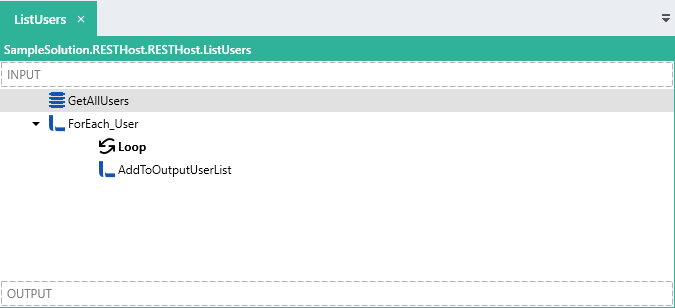
### Operation Logic
An [ExecuteSQL FNC](https://linx.software/docs/reference/plugins/database/content/executesql/) ( **GetAllUsers** ) queries the database for all user objects. Filtering is also applied inside the query if the optional query parameters contain values.
```sql
SELECT
id,
username,
password,
first_name,
last_name,
email
FROM
dbo.api_user
WHERE
first_name + ' ' + last_name LIKE
CASE
WHEN
ISNULL(@{ $ .Input.Data.name}, '') != ''
THEN
'%' + @{ $ .Input.Data.name} + '%'
ELSE
first_name + ' ' + last_name
END
OR email LIKE
CASE
WHEN
isnull(@{ $ .Input.Data.email}, '') != ''
THEN
'%' + ISNULL(@{ $ .Input.Data.email}, '') + '%'
ELSE
email
END
```
A [ForEach FNC](https://linx.software/docs/reference/plugins/linx/content/foreach/) ( **ForEach\_User** ) loops through the results returned from **GetAllUsers**.
For each row, the rows details are added to the `$.Result.Data.Response200` LSTTYP with the use of an [AddToList FNC](https://linx.software/docs/reference/plugins/linx/content/addtolist/) ( **AddToOutputUserList** ).
When the **ForEach\_User** completes, the `$.Result.Data.Response200` will contain a list of the users returned from the database.
### HTTP Request Details
#### HTTP Request
| Method | Path |
| — | — | — |
| `GET` | `/users` |
#### Request Headers
| Header | Value |
| — | — | — |
| `x-api-key` | `{api-key}` |
#### Request Parameters
| Name | Location | |
| --- | --- | --- |
| `name` | query | \*optional |
| `email` | query | \*optional |
#### Request Body
Do not supply a request body for this method.
#### Response
If successful, a `(200) OK` response is returned with a list of `user` objects in the response body.
* * *
### Example Request:
##### Successful response
```http
GET http://localhost:8080/demo/users?name=admin&x-api-key=0imfnc8mVLWwsAawjYr4Rx-Af50DDqtlx HTTP/1.1
User-Agent: PostmanRuntime/7.26.5
Accept: */*
Cache-Control: no-cache
Postman-Token: c09c7e1e-caa6-4b1f-a438-16300539667e
Host: localhost:8080
Accept-Encoding: gzip, deflate, br
Connection: keep-alive
HTTP/1.1 200 OK
Transfer-Encoding: chunked
Content-Type: application/json; charset=utf-8
Server: Microsoft-HTTPAPI/2.0
Date: Tue, 27 Oct 2020 12:01:03 GMT
[{"email":"","username":"ADMIN","id":"1","firstname":"admin","lastname":"admin"},{"email":"test2@test.com","username":"LINX","id":"2","firstname":"linx","lastname":"sotware"}]
```
* * *
## UpdateUser (PATCH)
### Summary
Update the details of a user in the database.
### Overview
The **UpdateUser** operation involves a `PATCH` request made to the `/users/{id}` endpoint.
The request contains an `Authorization` header containing the Bearer authentication token.
An `id` path parameter is included in the request URL.
A JSON request body is submitted containing a `User` object.
The request parameters are first validated according to the specification and then the request is authenticated internally according to the Bearer Authentication security scheme configured.
Once the data and authentication validations have taken place the **UpdateUser** operation is executed.
**Linx Designer view**
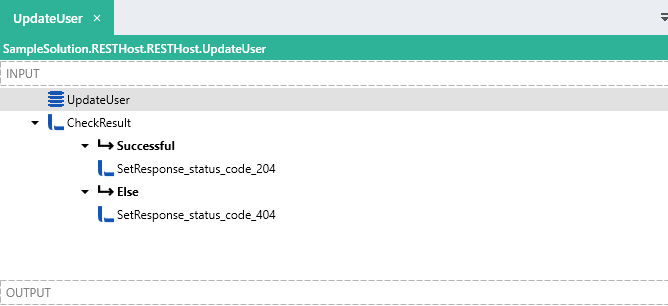
### Operation Logic
An [ExecuteSQL FNC](https://linx.software/docs/reference/plugins/database/content/executesql/) ( **UpdateUser** ) is used to update the details of `User` record in the database matching the `ID` path parameter.
```sql
UPDATE dbo.api_user
SET
email = CASE WHEN ISNULL(@{$.Input.Data.body.user.email},'') = '' THEN email ELSE @{$.Input.Data.body.user.email} END ,
first_name = @{$.Input.Data.body.user.firstname},
last_name = @{$.Input.Data.body.user.lastname}
WHERE id = @{$.Input.Data.id}
SELECT @@ROWCOUNT [ResultCount]
```
This returns a INT TYP with the affected row count.
An [IfElse FNC](https://linx.software/docs/reference/plugins/linx/content/ifelse/) ( **CheckResult** ) , evaluates the amount of affected rows. If the result is greater than 0 then the `$.Outut.Data.HttpContext` is set to:
```auto
{"StatusCode":"204"}
```
If no rows where updated then the `$.Outut.Data.HttpContext` is set to:
```auto
{"StatusCode":"404"}
```
### HTTP Request Details
#### HTTP Request
| Method | Path |
| — | — | — |
| `PATCH` | `/users/{id}` |
#### Request Headers
| Header | Value |
| — | — | — |
| `Authorization` | `Bearer {token}` |
| `Content-Type` | `application/json` |
#### Request Parameters
| Name | Location |
| — | — | — |
| `id` | path |
#### Request Body
```auto
{
"user":{
"email":"string"
"firstname":"string",
"lastname":"string"
}
}
```
#### Response
If successful, a `(204) no-content` response is returned.
* * *
### Example Request
```http
PATCH http://localhost:8080/demo/users/2 HTTP/1.1
Authorization: Bearer eyJhbGciOiJIUzI1NiIsInR5cCI6IkpXVCJ9.eyJpc3MiOiJsaW54Iiwic3ViIjoiIiwiYXVkIjoiIiwiZXhwIjoiMTYwMzgxMDE0Mi4wMTkwNDM0IiwibmJmIjoiIiwiaWF0IjoiIiwianRpIjoiIiwidW5pcXVlX25hbWUiOiIxIn0.GP992w6ddaqJUcJbxjLjD_hWImDSz-po8t-5OlpLeAk
Content-Type: application/json
User-Agent: PostmanRuntime/7.26.5
Accept: */*
Cache-Control: no-cache
Postman-Token: 5961341e-fc1a-4914-9e05-45309df67bd0
Host: localhost:8080
Accept-Encoding: gzip, deflate, br
Connection: keep-alive
Content-Length: 116
{
"user":{
"email":"test2@test.com",
"firstname":"linx2",
"lastname":"sotware"
}
}
...
HTTP/1.1 204 No Content
Server: Microsoft-HTTPAPI/2.0
Date: Tue, 27 Oct 2020 14:41:56 GMT
```
## Delete User (DELETE)
### Summary
Deletes a user record from the database.
A user record matching the `id` path parameter is deleted from the database.
### Overview
The **DeleteUser** operation involves a `DELETE` request made to the `/users/{id}` endpoint.
The request contains an `Authorization` header containing the Bearer authentication token.
An `id` path parameter is included in the request URL.
The request parameters are first validated according to the specification and then the request is authenticated internally according to the Bearer Authentication security scheme configured.
Once the data and authentication validations have taken place the **DeleteUser** operation is executed.
**Linx Designer View:**
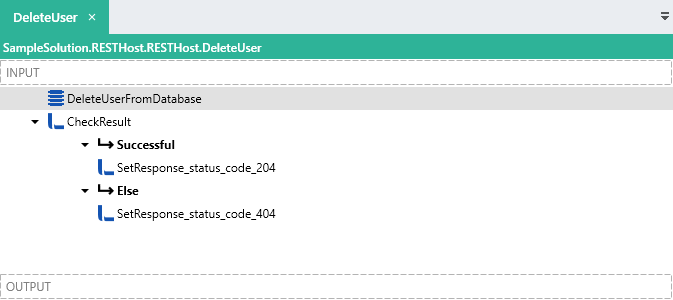
### Operation Logic
An [ExecuteSQL FNC](https://linx.software/docs/reference/plugins/database/content/executesql/) ( **DeleteUserFromDatabase** ) is used to delete a user record from the database that matches the `ID` path parameter. with the below query:
```sql
DELETE FROM [api_user] WHERE ID = @{$.Input.Data.id}
SELECT CASE WHEN @@ROWCOUNT > 0 THEN 1 ELSE 0 END [Result]
```
This returns a `Result` field which returns a `True` if the count is greater than 0.
An [IfElse FNC](https://linx.software/docs/reference/plugins/linx/content/ifelse/) ( **CheckResult** ) evaluates the of `DeleteUserFromDatabase.Result`.
If successful, the `$.Result.Data.HttpContext` is set to the below:
```auto
{"StatusCode":"204"}
```
If the query execution failed to delete a matching user, the `$.Result.Data.HttpContext` is set to the below:
```auto
{"StatusCode":"404"}
```
You will notice the `ResponseXXX` was not set as both of these `response body` are of type `no-content`.
* * *
### HTTP Request Details
#### HTTP Request
| Method | Path |
| — | — | — |
| `DELETE` | `/users/{id}` |
#### Request Headers
| Header | Value |
| — | — | — |
| `Authorization` | `Bearer {token}` |
#### Request Parameters
| Name | Location |
| — | — | — |
| `id` | Path |
#### Request Body
Do not supply a request body for this method.
#### Response
If successful, a `(204) no-content`; response is returned.
* * *
### Example Request:
##### Successful response
```http
DELETE http://localhost:8080/demo/users/5 HTTP/1.1
Authorization: Bearer eyJhbGciOiJIUzI1NiIsInR5cCI6IkpXVCJ9.eyJpc3MiOiJsaW54Iiwic3ViIjoiIiwiYXVkIjoiIiwiZXhwIjoiMTYwMzgwNTQ4Ni4zMTc3MjMiLCJuYmYiOiIiLCJpYXQiOiIiLCJqdGkiOiIiLCJ1bmlxdWVfbmFtZSI6IjEifQ.ezpAaLUPXfSKkwEJufN1ePEHIVy_igr9nexE8OzqgX0
User-Agent: PostmanRuntime/7.26.5
Accept: */*
Cache-Control: no-cache
Postman-Token: 6719ef6a-0411-46ab-b3c5-317454934dc9
Host: localhost:8080
Accept-Encoding: gzip, deflate, br
Connection: keep-alive
...
HTTP/1.1 204 No Content
Server: Microsoft-HTTPAPI/2.0
Date: Tue, 27 Oct 2020 10:31:35 GMT
```
* * *
* * *
---
### Author:  [@ronan](https://community.linx.software/community/u/ronan)
#### Post date: [October 28, 2020, 3:27pm UTC](https://community.linx.software/community/t/resthost-sample-solution-crud-and-file-operations/467/2 "2020-10-28T15:27:54Z")