# Xero CreateInvoice
**URL:** https://community.linx.software/community/t/xero-createinvoice/316
**Category:** Support
**Created:** [September 9, 2018, 10:01pm UTC](https://community.linx.software/community/t/xero-createinvoice/316 "2018-09-09T22:01:04Z")
**Posts on this page:** 13
**Page:** 1
### Author:  [@Leigh\_Morum](https://community.linx.software/community/u/Leigh_Morum)
#### Post date: [September 9, 2018, 10:01pm UTC](https://community.linx.software/community/t/xero-createinvoice/316/1 "2018-09-09T22:01:04Z")
Hi,
I would greatly appreciate your help with some difficulty I’m having automating the creation of invoices in Xero. I successfully set various Invoice properties. However in addition to the Invoice properties, I have to pass through a list of the line items for the invoice.
The challenge I’m having is passing my dynamic LineItems list through to the Xero.Invoices.CreateInvoice function in a valid way.
I have built the list of line items using a string variable called x and lets consider the following example. Consider that x contains the following string data:
[{“Description”:“S BURGER BUNS”, “Quantity”:600.0, “UnitAmount”:2.0, “ItemCode”:“FBOO5”, “Tracking”:[{“Name”:“Stores”,“Option”:“ABC Burgers”}]},{“Description”:“S BURGER BUN 50G”, “Quantity”:30.0, “UnitAmount”:1.2066666667, “ItemCode”:“SBBB”, “Tracking”:[{“Name”:“Stores”,“Option”:“ABC Burgers”}]},{“Description”:“S HERO ROLL”, “Quantity”:6.0, “UnitAmount”:2.1, “ItemCode”:“FB001”, “Tracking”:[{“Name”:“Stores”,“Option”:“ABC Burgers”}]}]
In Xero.Invoices.CreateInvoice, I have set the LineItems property to “=x”, yet when I run my project I get the following error:
Could not cast or convert from System.String to System.Collections.Generic.List`1[Twenty57.Linx.Components.Xero.Entities.Common.Types.Compiled.LineItem]
However, if I literally paste in the above string data into the LineItems property, it works perfectly.
PS: I have also built a LIST variable and tried passing that through to the LineItems property instead of the above string variable x - but get the identical error message.
---
### Author:  [@Dawie\_Botes](https://community.linx.software/community/u/Dawie_Botes)
#### Post date: [September 10, 2018, 6:03am UTC](https://community.linx.software/community/t/xero-createinvoice/316/2 "2018-09-10T06:03:35Z")
Hi Leigh,
I just want to understand your scenario better.
For the Xero Invoice component, to send the LineItems, you need a “List” of “LineItems”. You can find the “LineItem” component under Xero → Common → LineItem:
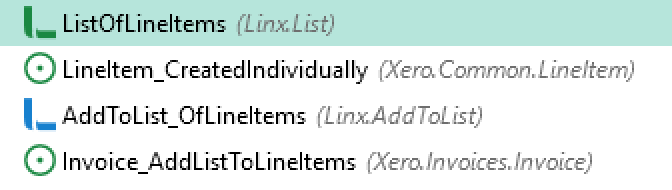
Please let me know if you need more info.
Regards,
Dawie
---
### Author:  [@Leigh\_Morum](https://community.linx.software/community/u/Leigh_Morum)
#### Post date: [September 10, 2018, 7:11am UTC](https://community.linx.software/community/t/xero-createinvoice/316/3 "2018-09-10T07:11:40Z")
Hi Dawie,
I have tried that - built the list of line items into the Linx.List variable using Linx.AddToList.
However, when I pass that list variable to the LineItems property of the Xero.Invoices.CreateInvoice component I get the same error.
Regards,
Leigh
---
### Author:  [@Dawie\_Botes](https://community.linx.software/community/u/Dawie_Botes)
#### Post date: [September 10, 2018, 7:14am UTC](https://community.linx.software/community/t/xero-createinvoice/316/4 "2018-09-10T07:14:43Z")
Hi Leigh,
What is the type of your List?

---
### Author:  [@Leigh\_Morum](https://community.linx.software/community/u/Leigh_Morum)
#### Post date: [September 10, 2018, 7:35am UTC](https://community.linx.software/community/t/xero-createinvoice/316/6 "2018-09-10T07:35:28Z")
I’m building a list of Xero.Common.Lineitem entries…

---
### Author:  [@Leigh\_Morum](https://community.linx.software/community/u/Leigh_Morum)
#### Post date: [September 10, 2018, 7:36am UTC](https://community.linx.software/community/t/xero-createinvoice/316/7 "2018-09-10T07:36:53Z")
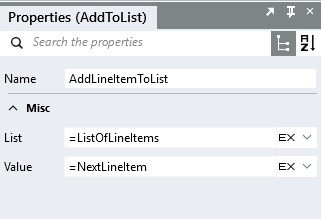
Here are the properties of AddLineItemToList…
---
### Author:  [@Leigh\_Morum](https://community.linx.software/community/u/Leigh_Morum)
#### Post date: [September 10, 2018, 7:38am UTC](https://community.linx.software/community/t/xero-createinvoice/316/8 "2018-09-10T07:38:21Z")
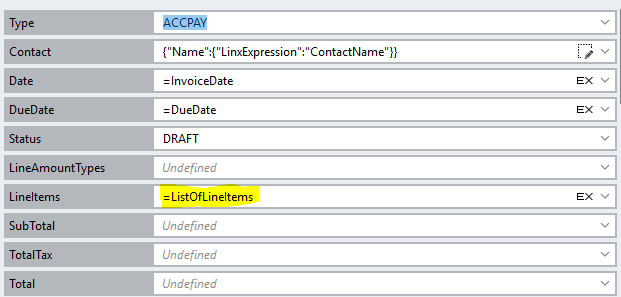
Here I pass the list to Xero.Invoices.CreateInvoice…
---
### Author:  [@Leigh\_Morum](https://community.linx.software/community/u/Leigh_Morum)
#### Post date: [September 10, 2018, 7:39am UTC](https://community.linx.software/community/t/xero-createinvoice/316/9 "2018-09-10T07:39:37Z")
And here is the error…
ImportStockPurchases.IfLastInvoiceValid: Error converting value “{“Description”:“S BURGER BUNS”,“Quantity”:600.0,“UnitAmount”:2.0,“ItemCode”:“FBOO5”,“AccountCode”:null,“LineItemID”:null,“TaxType”:null,“TaxAmount”:null,“LineAmount”:null,“Tracking”:[{“Name”:“Stores”,“Option”:“Watergate Steers”,“TrackingCategoryID”:null,“TrackingOptionID”:null}],“DiscountRate”:null}” to type ‘Twenty57.Linx.Components.Xero.Entities.Common.Types.Compiled.LineItem’. Path ‘LineItems[0]’, line 1, position 482.
Could not cast or convert from System.String to Twenty57.Linx.Components.Xero.Entities.Common.Types.Compiled.LineItem.
---
### Author:  [@Dawie\_Botes](https://community.linx.software/community/u/Dawie_Botes)
#### Post date: [September 10, 2018, 7:49am UTC](https://community.linx.software/community/t/xero-createinvoice/316/10 "2018-09-10T07:49:14Z")
Hi Leigh,
You’re 99% there. Just your List type needs to be a LineItem:
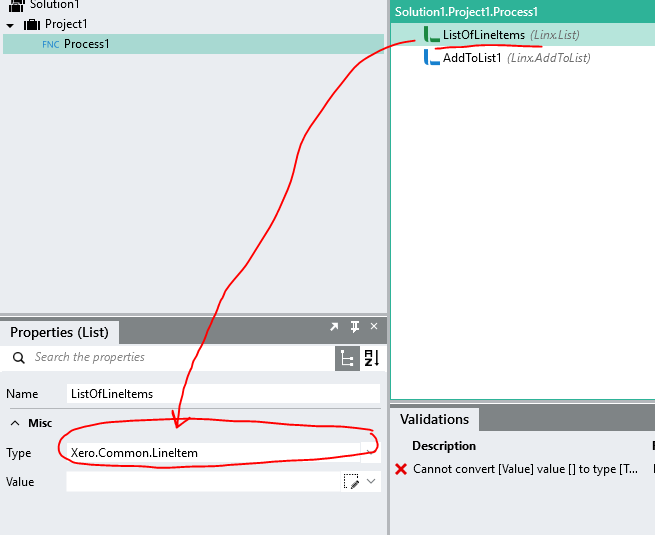
---
### Author:  [@Leigh\_Morum](https://community.linx.software/community/u/Leigh_Morum)
#### Post date: [September 10, 2018, 8:00am UTC](https://community.linx.software/community/t/xero-createinvoice/316/12 "2018-09-10T08:00:57Z")
Hoorah! Thank you I have found success!
Your help is truly appreciated.
---
### Author:  [@Leigh\_Morum](https://community.linx.software/community/u/Leigh_Morum)
#### Post date: [September 10, 2018, 8:20am UTC](https://community.linx.software/community/t/xero-createinvoice/316/13 "2018-09-10T08:20:13Z")
I’m finding that when I try and clear the list of lineitems to be ready for the next invoice, I now get the following error:
Object must implement IConvertible.
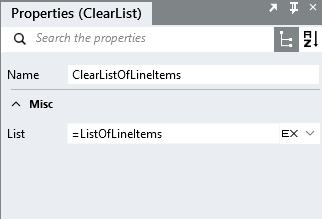
---
### Author:  [@Dawie\_Botes](https://community.linx.software/community/u/Dawie_Botes)
#### Post date: [September 10, 2018, 8:36am UTC](https://community.linx.software/community/t/xero-createinvoice/316/14 "2018-09-10T08:36:20Z")
Hi Leigh,
Have you stepped through the process to see where the error occurs? I’ve tried the ClearList function on my side and it does work, so it might throw the error at another point.
To step through the process, right click on the first component and select “Add Breakpoint”. Then click on Debug, and step through the process. You can add breakpoints at more places through the process.
Dawie
---
### Author:  [@Leigh\_Morum](https://community.linx.software/community/u/Leigh_Morum)
#### Post date: [September 10, 2018, 8:43am UTC](https://community.linx.software/community/t/xero-createinvoice/316/15 "2018-09-10T08:43:15Z")
Hi Dawie,
Very wierd - I tried it again and it’s working although I haven’t made any changes.
Thanks for replying.