Calculating the Difference Between Two Dates in Linx (Handling Leap Years)
When working with date calculations in Linx, especially for determining the difference between two dates, it’s important to ensure your approach is both accurate and robust to all calendar scenarios—such as leap years.
Note that this approach will give you the difference between to dates in days
While some solutions manually add days based on year or month differences, this can easily introduce errors, especially when dealing with leap years or months of varying lengths.
The recommended method in Linx is to use the built-in expression editor to subtract one DateTime value from another:
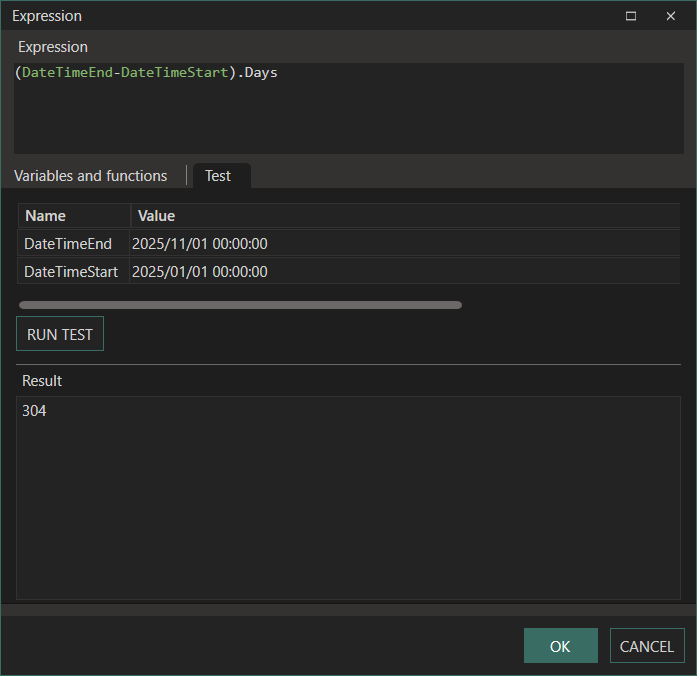
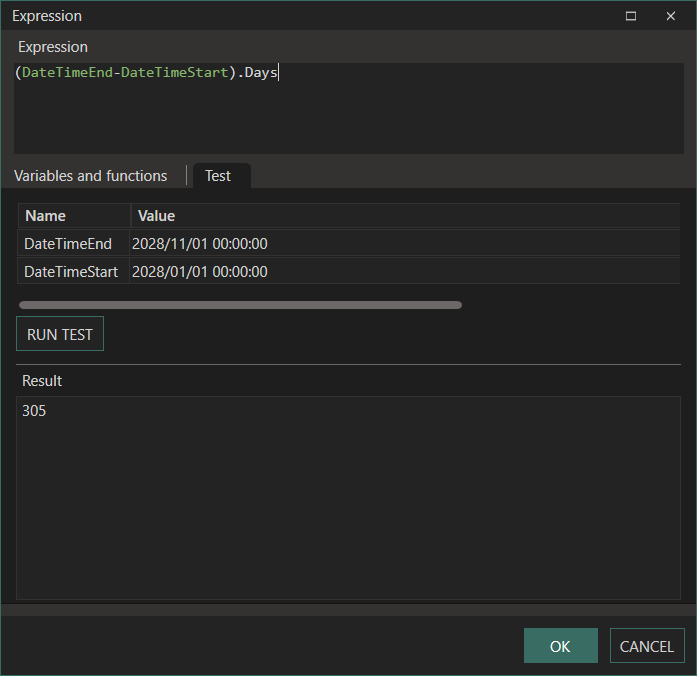
(DateTimeEnd - DateTimeStart).Days
This expression will return the exact number of days between the two dates, and it will correctly include or exclude February 29th in leap years and handle all other irregularities in the calendar for you.
Note:
This approach requires that both values (DateTimeStartandDateTimeEnd) are already of theDateTimetype. If your source data is already stored asDateTimevalues (passed in as parameters or already defined as such in your process), you’re good to go—no extra parsing or conversion needed!
Example
Here you can see the calculation done with no leap year dates:
And here is the calculation done with dates that are part of a leap year:
Summary
- Use
(DateTimeEnd - DateTimeStart).Daysfor a safe, leap-year aware calculation. - Ensure both inputs are of type
DateTime.
This will provide you with a simple, accurate, and future-proof date difference calculation in Linx.